Models
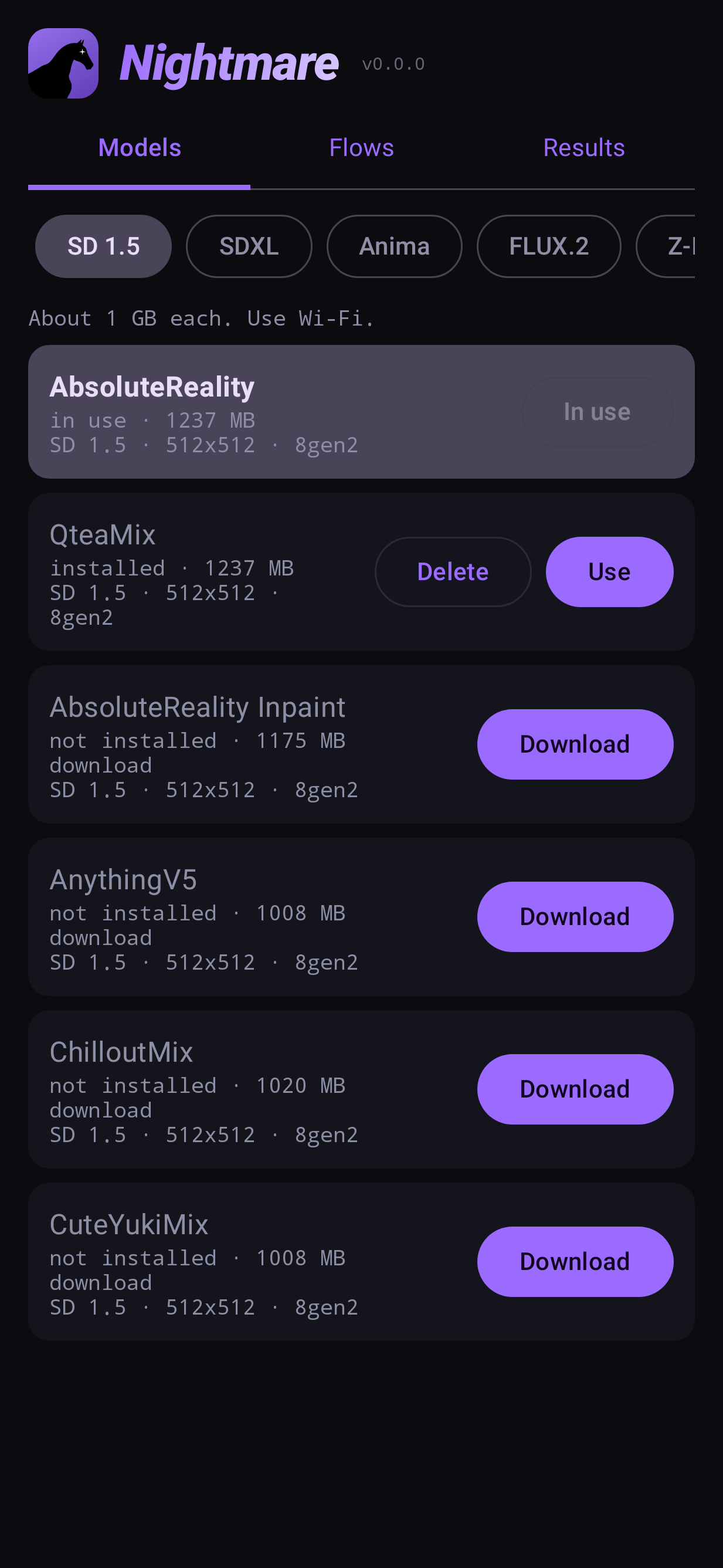
A model (or checkpoint) is the trained network that actually draws. Nightmare ships without any — you download the ones you want from Models, and each is downloaded once and kept.
Models come in families. A family decides how prompts are written, what sizes it draws and which phones can run it; inside a family, models differ in style.
The families
| family | models | size each | draws | style | needs |
|---|---|---|---|---|---|
| SD 1.5 | 6 | ~1 GB | 512–1024 | Fast; realistic, anime and general mixes | Snapdragon 888+ |
| SD 1.5 Swap (experimental) | AbsoluteReality, CuteYukiMix, or your own npuforge conversion | ~1.3 GB | 512 | LoRAs and ControlNet (canny, depth, openpose) chosen per render | defaults: 8 Elite+; your own conversion: the phone that made it |
| SDXL | 10 | ~3.5 GB | 1024 | Sharper, better composition | 8 Gen 3+ |
| Anima | 9 | ~4.3 GB | 1024 | Anime; slow (about 80 s a picture) | 8 Gen 3+ |
| FLUX.2 | Klein 4B, Klein 9B | 6.7 GB, 10.7 GB | 512–2048 | Understands sentences; edits photos. 9B: more detail, slower, starts at 768 | 8 Elite+ |
| Z-Image | Turbo | 8.8 GB | 512–2048 | Photorealistic, fast for its size | 8 Elite+ |
| Qwen Image | 2.1 | 10.8 GB | 512–2048 | Follows long instructions, legible text; edits photos; slow | 8 Elite+ |
| Krea 2 | Turbo | 9.5 GB | 512–2048 | Text to image only | 8 Elite+ and 16 GB RAM |
Besides picture models, Models also holds:
- Upscalers — small models that enlarge a picture. Upscale
- Video — the text- and image-to-video models, one 8.6 GB download. Video
Which to start with
- Any phone: AbsoluteReality (realistic) or AnythingV5 (anime), SD 1.5. Small and quick.
- To inpaint: add AbsoluteReality Inpaint, a dedicated inpainting model.
- 8 Gen 3 and up: an SDXL model for sharper, larger pictures.
- 8 Elite: FLUX.2 Klein — prompts in plain sentences, and photo editing.
In this section
- Download, switch and delete — the Models tab row by row.
- Bring your own — import a model from CivitAI, LocalDream or npuforge.
- LoRAs and embeddings — small add-ons that change a model's style.